Fixed physician questions
Antibiotic prophylaxis, anticoagulant interruption, permitted antibiotic, additional precautions, and a signature and date line. The same questions on every form, so the physician's office knows exactly what to return.
Medical Clearance
Finished example
Medical clearance for dental treatment
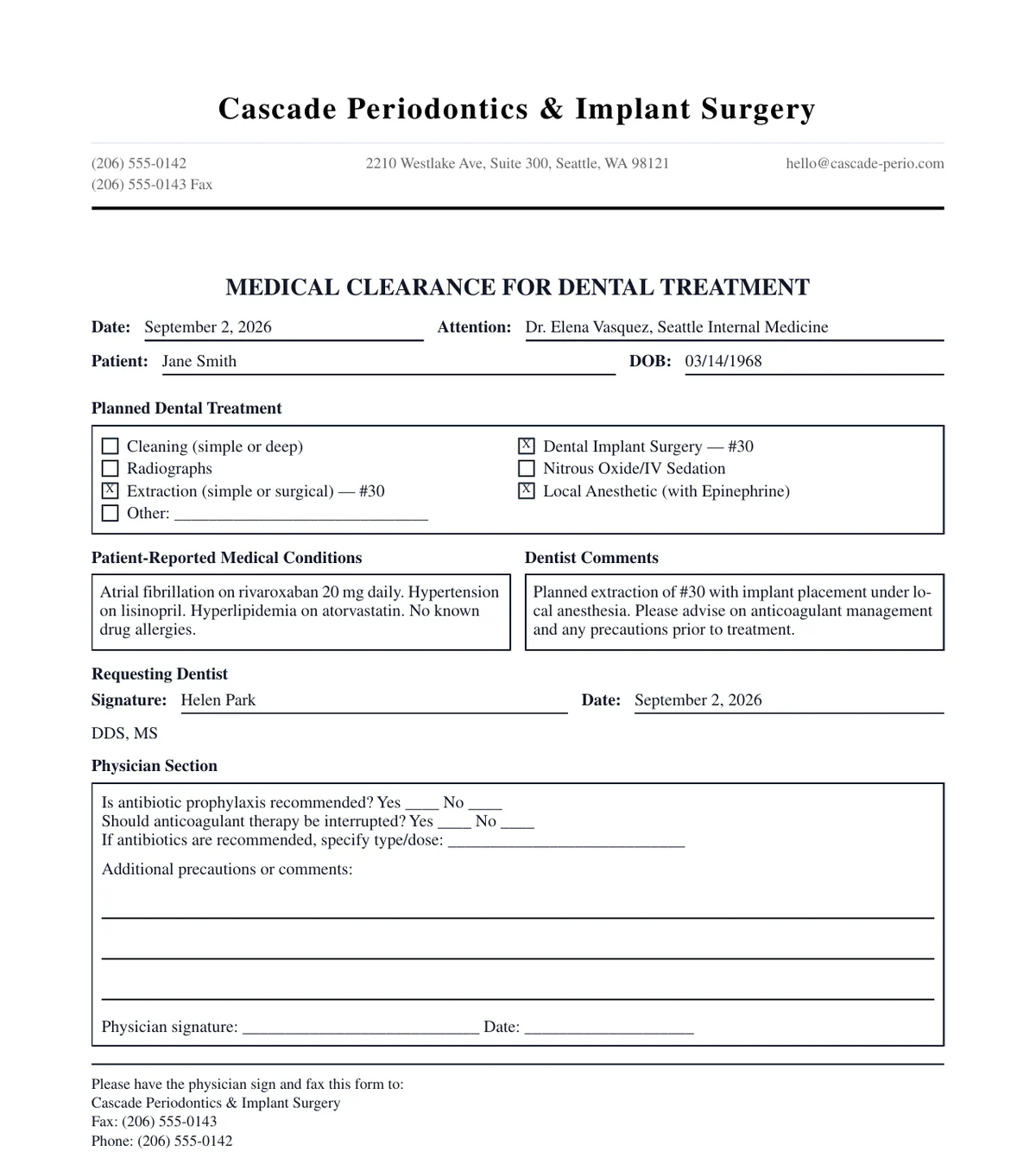
ToothNote.ai prepares a one-page medical clearance form from the planned treatment and the patient's reported conditions. The physician answers a fixed set of questions, signs, and returns the form to your practice.
What happens next
Finished example
Medical clearance for dental treatment
Why a form
The first version of this workflow produced a prose letter. The first real clearance died in draft because the physician's office works from a form they can check, sign, and fax. The form is now the artifact. Every question the physician needs to answer is already on the page.
Antibiotic prophylaxis, anticoagulant interruption, permitted antibiotic, additional precautions, and a signature and date line. The same questions on every form, so the physician's office knows exactly what to return.
Cleaning, radiographs, extraction, implant surgery, sedation, local anesthetic with epinephrine, and an Other line that carries tooth numbers.
ToothNote.ai drafts the patient's reported conditions and your comments to the physician from the exam and health history. Nothing enters the narrative that is not in the record. You edit both fields in place and the preview re-renders.
When your practice fax is on file, the footer tells the physician to sign and fax the form back to you. No hardcoded text.
One connected workflow
Start from the Home grid or from an approved exam. Staff can prepare the form; the signing clinician approves it.
Choose New Medical Clearance, or add one from an approved exam so the patient, treatment, and conditions are prefilled.
Enter the physician and their email, or pick a recent recipient.
Toggle the treatment boxes, edit the conditions and comments, and watch the form preview update. Dictate changes if that is faster.
Email the PDF to the physician's office, download it, or copy the text. ToothNote.ai marks the clearance sent only after the email is accepted.
The physician's office returns it by fax or email. Your team files it in the practice management system, which remains the record.
Clear boundaries
ToothNote.ai does not transmit faxes, does not collect an electronic signature from the physician, and does not track whether the form came back. The clearance round trip runs on paper and fax in most physician offices today, and the form is built to survive that trip: large check boxes, high-contrast lines, one page at typical length. Your practice management system stays the official chart.
Plan availability
Medical Clearance is included in Pro and Practice. Any team member with write access can prepare a clearance; the signing clinician approves it. Practices can upload their own clearance form layout in Settings under Format.
Compare plansCommon questions
A one-page form sent to a patient's physician before treatment that asks whether the planned dental procedure is safe given the patient's medical conditions and medications. The physician answers the questions, signs, and returns it to the dental practice.
Because physician offices return forms, not letters. Our first version produced a prose letter and the first real clearance died in draft, because the physician's office works from something they can check, sign, and fax. The form is now the artifact, and every question the physician needs to answer is already on the page.
No. ToothNote.ai does not transmit faxes, does not collect an electronic signature from the physician, and does not track the return. The clearance round trip runs on paper and fax in most physician offices today, so the form is built to survive that trip with large check boxes, high-contrast lines, and one page at typical length.
Yes. Practices can upload their own clearance form layout in Settings under Format.
Any team member with write access can prepare one, starting from the Home grid or from an approved exam. The signing clinician approves it. Medical Clearance is included in Pro and Practice.