Workflows

Outbound Referral

Send the patient to the right office with a referral they can actually use.

Finished example

Patient copy and office copy

Ready after review
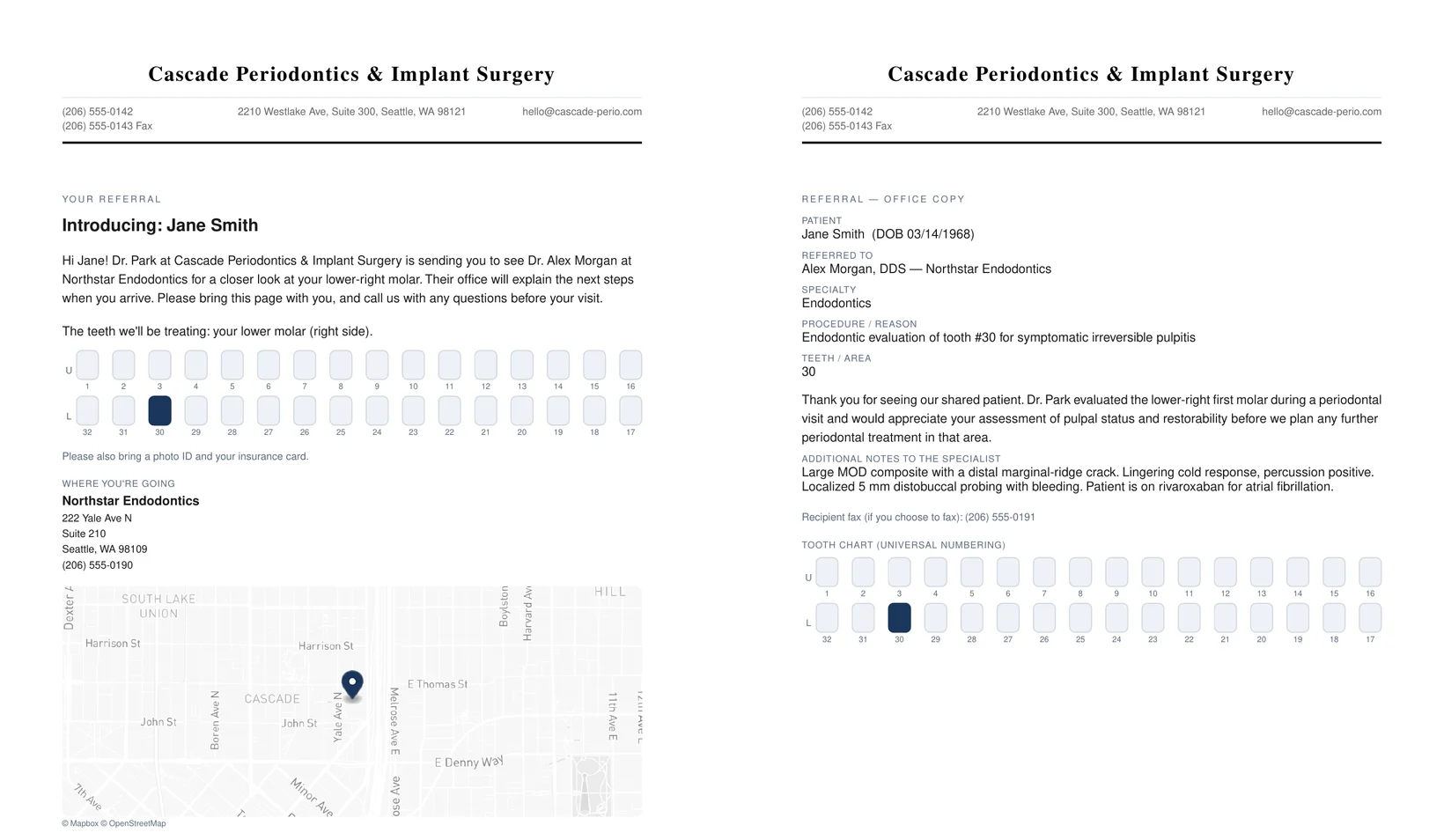
Finished ToothNote.ai outbound referral for Jane Smith, patient copy beside office copy: the patient copy with a plain-language introduction, tooth 30 marked on a labeled chart, the receiving endodontist's address and phone, and a printed map; the office copy with patient, referred-to doctor, procedure, teeth, notes, and recipient fax
Both pages, rendered by ToothNote.ai for a fictional patient and practice. Left: the patient copy with where to go, what to bring, the marked tooth, and a map. Right: the office copy with the clinical request.

ToothNote.ai generates two one-page documents on your own letterhead: a patient copy that says where to go, why, and what to bring, and an office copy with the clinical request for the receiving practice.

Patient copy and office copyLabeled tooth chart on bothMap to the receiving officeEmail, download, or print

What happens next

  1. 1Send a short request
  2. 2Review your workflow with our team
  3. 3Start guided setup together

Two readers, two pages

The patient and the receiving office need different things from the same referral.

Most practices hand the patient the receiving office's card and dictate a prose letter for the office. ToothNote.ai produces your practice's own referral, designed for each reader, from the same reviewed facts.

The patient copy says where to go

The receiving practice name, address, and phone always appear, with a plain-language sentence about the procedure and a reminder to bring ID and insurance. When the address resolves, a clean printed map of the receiving office sits beside it.

The office copy carries the request

Referring doctor, patient, procedure and reason, teeth or area, and your notes to the specialist. The receiving doctor's fax number prints on the page so your staff know where to send it.

One tooth chart, both copies

A labeled Universal 1 to 32 chart with the affected teeth marked, drawn from the teeth you entered. Ranges, quadrants, and arches work. No hand-circled diagrams.

Your letterhead, not theirs

The same letterhead your letters use, from the same settings. ToothNote.ai generates the referring practice's document, never a copy of the receiving office's card.

One connected workflow

How a referral goes out

Office staff can make a referral without a clinical note. Clinicians can refer out from an approved exam with the case already filled in.

  1. 01

    Start the referral

    Choose New Referral from the Home grid, or add an outbound referral from an approved exam or note so the patient and procedure are prefilled.

  2. 02

    Pick the receiving doctor

    Choose from your referring-doctor directory and the address, phone, and fax fill in. Add a doctor manually when they are not in the directory yet.

  3. 03

    Enter the procedure, teeth, and notes

    Type them or dictate them. ToothNote.ai writes the connecting sentences; your fields render exactly as you entered them.

  4. 04

    Review each copy

    Switch the preview between the patient copy and the office copy. Edit until both read the way you want.

  5. 05

    Deliver each copy on its own path

    Email the office copy to the receiving practice. Hand, email, or print the patient copy. Each copy records its own delivery, and nothing is marked sent until it actually went.

Clear boundaries

What ToothNote.ai does not do here

ToothNote.ai does not transmit faxes; the receiving office's fax number is printed for your staff. It does not reproduce another practice's branded referral card. It does not send both copies to one recipient. A referral letter back to the doctor who sent you the patient is a different workflow, and the site keeps the two directions separate on purpose.

Plan availability

Start with the work you need.

Outbound Referral is included in Pro and Practice. Any team member with write access can create and send one.
Compare plans

Common questions

Outbound Referral questions specialists ask.

What is an outbound referral in ToothNote.ai?

A referral that sends your patient on to another office. It produces two one-page documents on your own letterhead: a patient copy saying where to go, why, and what to bring, and an office copy carrying the clinical request for the receiving practice.

How is that different from a referral letter?

Direction. A referral letter goes back to the doctor who sent you the patient. An outbound referral sends the patient to a different office. ToothNote.ai keeps the two workflows separate so the wrong document never goes to the wrong reader.

Why two documents instead of one?

The patient and the receiving office need different things from the same referral. Most practices hand the patient the receiving office's business card and dictate a prose letter for the office. ToothNote.ai produces your own referral, designed for each reader, from the same reviewed facts.

Does ToothNote.ai send the referral by fax?

No. ToothNote.ai does not transmit faxes. The receiving office's fax number is printed on the document for your staff, and ToothNote.ai never sends both copies to one recipient.

Can front-desk staff create a referral without a clinical note?

Yes. Office staff can make a referral without a clinical note, and clinicians can refer out from an approved exam with the case already filled in. Outbound Referral is included in Pro and Practice, and any team member with write access can create and send one.