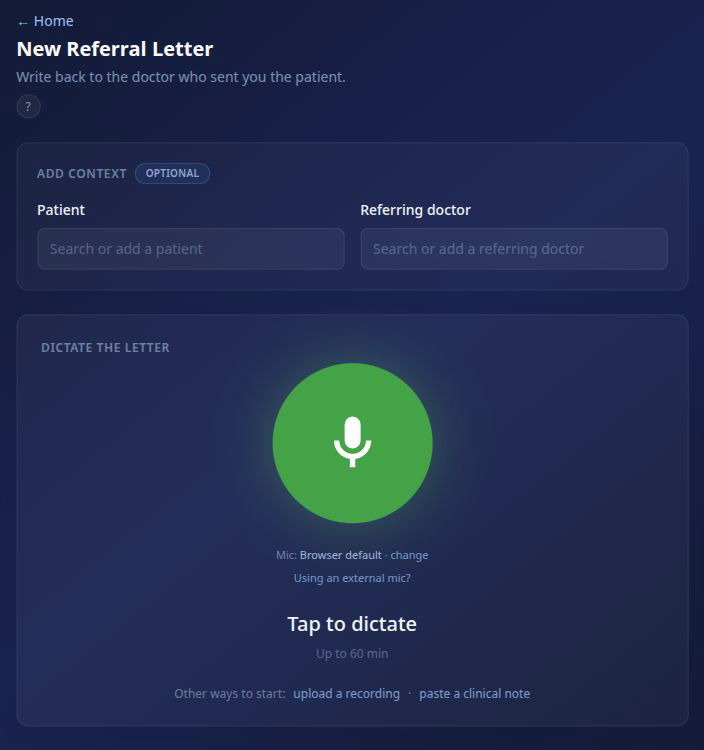
Open New Referral Letter
From the ToothNote.ai dashboard, choose New Referral Letter. The page places the optional patient and referring-doctor context above Dictate the letter, so you can connect the case before recording.
Choose the patient
In Add context, select the patient whose case you are documenting. This connects the recording and finished letter to the correct patient record.
If the patient is not already in ToothNote.ai, add the patient before continuing. Taking this step now avoids having to reconnect the letter during review.
Choose the referring doctor
Next, select the doctor who sent the patient to your practice. ToothNote.ai uses that record to address the letter, maintain the referral relationship, and make email delivery available when the doctor has an email address.
If the doctor is missing, add the doctor or import your practice's referring-doctor list. Once saved, the doctor can be reused across future patients and letters.
Tap to dictate
Tap the dictation control and explain the case naturally. Include the findings, assessment, treatment discussion, plan, and follow-up you want the receiving doctor to know.
I saw Jordan Lee today for evaluation of the lower left molar. The tooth is nonrestorable, and we discussed extraction with possible ridge preservation. Jordan would like to proceed. Thank Dr. Rivera for the referral, and let her know we will send an update after treatment.
Review the draft
Before approval, confirm:
- The clinical facts and treatment plan are accurate.
- The letter is going back to the correct referring doctor.
- The correct clinician is signing it.
- The patient and letter date are correct.
- The wording sounds appropriate for a professional colleague.
Approve and deliver
After approval, you can:
- Copy the letter as plain text.
- Download it in an available output type.
- Send a draft to your own inbox.
- Email it to the referring doctor when an email address is available.
If direct email is unavailable, open the doctor under Doctors and add the missing email address. You can still copy or download the approved letter while the contact record is being completed.
Use another starting point when needed
Dictation is the primary path, but ToothNote.ai can also:
- Create a referral letter from an uploaded recording.
- Create a referral letter from an existing clinical note.
Use these alternatives when the source material already exists. For new work, a short natural dictation is usually the quickest route from case to reviewed letter.