Choose the fastest import path
Start with the source your practice already maintains. ToothNote.ai gives you several paths so you do not have to rebuild the directory by hand.
Import spreadsheets or referral documents
The upload flow accepts:
- CSV and XLSX spreadsheets.
- PDF referral letters.
- JPG, PNG, HEIC, and WEBP images.
- Screenshots containing referral information.
Each import is limited to 150 doctors. ToothNote.ai extracts names, practices, addresses, and contact information for review. Spreadsheet import also shows potential matches with existing doctors before anything is saved.
Read a practice website
Paste the public website of a referring practice. ToothNote.ai reads a small number of public pages and presents the providers and contact information it finds.
Review every extracted doctor before importing. Practice websites may contain old locations, incomplete provider lists, or shared contact details.
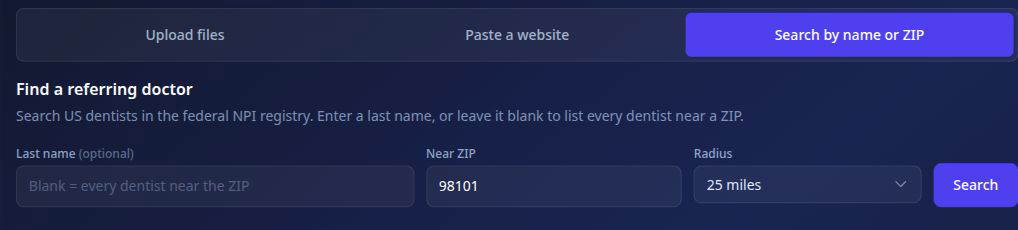
Search the NPI registry
Search by last name, ZIP code, and radius. Leave the name blank to list dentists near the selected ZIP code.
Results may include:
- Provider name and NPI.
- Specialty or taxonomy.
- Practice address and phone number.
- Website or email information when available.
Add one doctor manually
Use Add Doctor when you know the provider or only need one record. You can enter the name, preferred name, specialty, practice, NPI, email, phone, fax, website, and mailing address.
You can also upload a single referral document to prefill the form, then review the extracted details before saving.
Review matches and duplicates
- Compare proposed records with existing doctors.
- Skip a new record when the correct doctor already exists.
- Confirm the practice, location, specialty, and NPI.
- Correct extracted information before saving.
- Save only the records you intend to use.
Complete the contact-information pass
- Add missing email addresses.
- Confirm phone and fax numbers.
- Verify mailing addresses.
- Correct preferred names and practice names.
- Complete any records created during dictation.
Use the directory in real work
The next time you dictate a referral letter or record a patient exam, select the referring doctor from the saved directory.
A completed directory helps ToothNote.ai:
- Address letters consistently.
- Reuse doctors across cases.
- Show referral activity and active-patient relationships.
- Surface missing contact details.
- Deliver approved letters more reliably.