Periodontal charting

The whole tooth story. Beyond pocket depths.

Keep site measurements, tooth-specific findings and clinical context together in a chart you can inspect, correct and revisit. Preserve the detail that belongs in the record and the explanation that belongs in the conversation.

  • Six-site measurements
  • Tooth-specific findings
  • Dated evidence and review

Early access with guided setup for your practice.

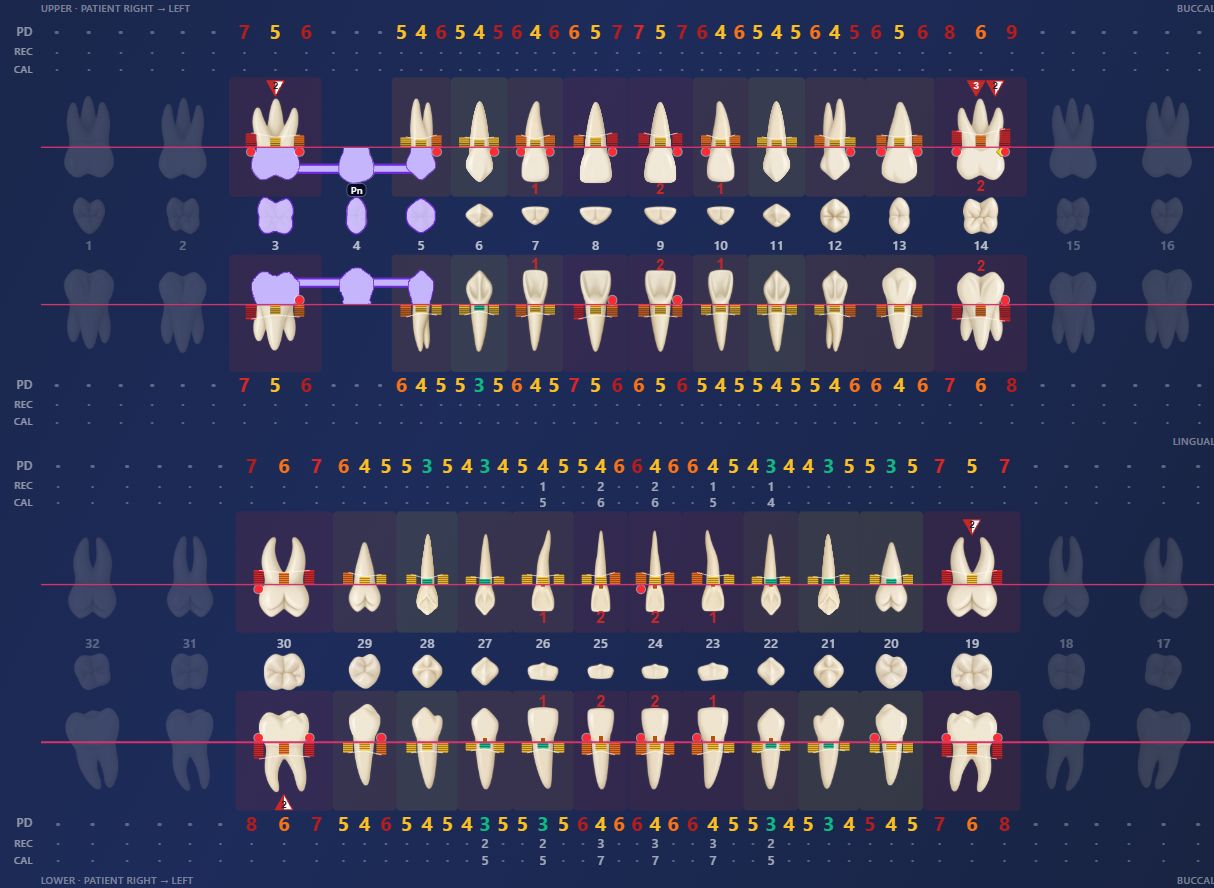
ToothNote.ai periodontal chartCascade Periodontics · Fictional demo practice
Actual ToothNote.ai chart showing anatomical teeth, site measurements, bleeding markers, restoration context and clinical attachment loss view
Actual product view. Clinical findings remain subject to doctor review.Explore periodontal charting →

Clinical detail needs a place, a source and a history.

A number is more useful when the doctor can see which site it describes, what else was found and how it relates to the documented exam.

01

Measurements stay at the site.

Review probing depths and recession alongside bleeding, suppuration and other recorded periodontal findings. The chart keeps six-site measurements connected to the tooth, with measurement views for inspecting the clinical picture.

02

The tooth carries more than measurements.

Inspect mobility, furcation involvement, implant or missing-tooth state, restorations, contacts and tooth position. These are distinct findings with their own meaning, rather than extra numbers forced into a pocket-depth row.

03

Review the source and correct the record.

Open tooth detail to inspect documented findings and their context. Review captured information, resolve uncertain entries and preserve the reason for a correction. A missing finding should not silently become a normal finding.

04

Return to the case over time.

Dated findings give follow-up visits context. Review earlier evidence alongside the current case, then carry the relevant, clinician-reviewed information into the note, letter and patient explanation.
How it fits the day

From the examination to a record you can use.

  1. 01

    Capture the encounter

    Use the exam workflow and supporting chart or clinical evidence appropriate to the visit.

  2. 02

    Inspect the findings

    Review site measurements and tooth details, including missing or unresolved information.

  3. 03

    Confirm the clinical record

    Correct the evidence and review the resulting documentation. The doctor owns the clinical decisions.

  4. 04

    Explain and hand off

    Use the reviewed case for the note, referring-dentist communication and patient next steps.

Detailed clinical work alongside your PMS.

The Patient Chart gives the team a place to inspect the longitudinal case and its evidence. Your practice management system remains the official record. Filing and data handoffs depend on the connection configured for your practice.

Explore supported connections →

A few practical questions.

Which findings can I review beyond probing depths?

The chart supports site findings such as recession, bleeding and suppuration, plus tooth-level context including mobility, furcations, implants, missing teeth, restorations, contacts and position. Availability of a finding in a case depends on the information captured and reviewed.

Does the chart make a diagnosis or treatment decision?

The doctor reviews the evidence and owns the diagnosis, treatment plan and final record. Missing or unresolved information must be checked rather than treated as a normal finding.

Can I review earlier findings?

Dated findings and their evidence give follow-up visits context. Review earlier documentation alongside the current case, and confirm the relevant information before carrying it into a new note or explanation.

How does this relate to specialty measurements?

Specialty measurements describe the structured clinical evidence captured for an encounter. The Patient Chart brings those findings into tooth-level and longitudinal context for review and follow-up.

See it with your practice in mind.

Walk through the workflow, the connection to your PMS and the setup your team needs.

Book a demo